Connection Instructions
These instructions apply to the following devices:
- QNA-600
- QNA-D500
- CVM-D50
- CVM-D400
- LM-D44
- LM-A42-D11
Standard connection (public Internet)
To connect your device with Scout, make sure communications are properly configured and enable the connection with Scout:
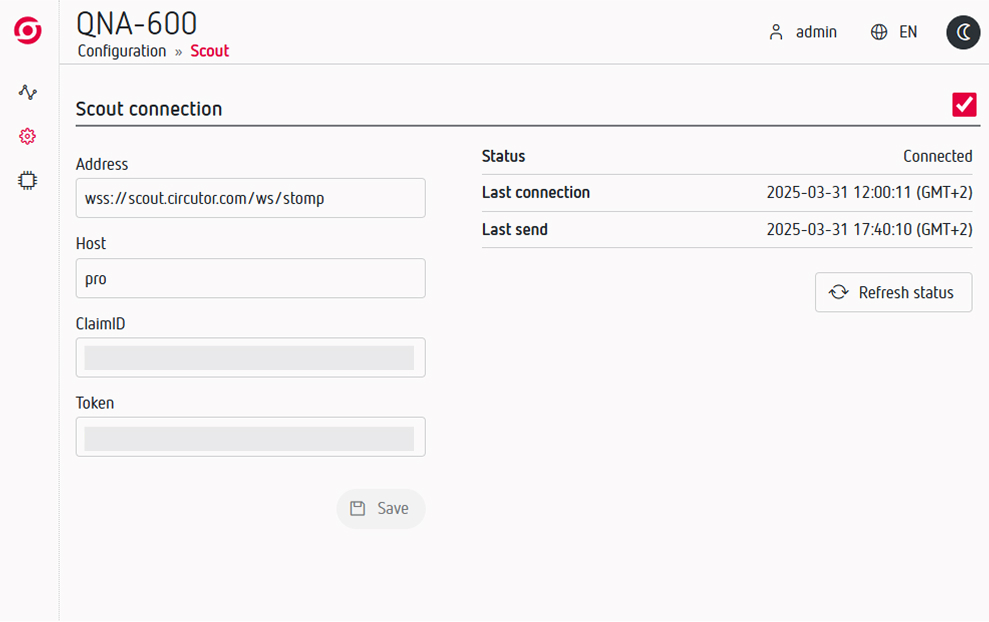
- Access the device's web server.
- In the left menu, go to Settings → Scout.
- Enable the "Connect to Scout" option.
That's it! Your analyzer is now sending data. The last step is to add it to your project in Scout—follow the instructions below.
All set! Your device is now sending data. The only step left is to add it to your project in Scout.
Follow the instructions on the Add Devices page to complete the process.
2. Connection via VPN SIM card (optional)
If the installation does not have Internet access, or your IT policies do not allow the devices to connect through the public Internet, you can use a VPN SIM connection.
The VPN SIM provides a private network connection between the device and Scout. Depending on the device, the SIM can be inserted directly into the device or used with an external modem or router.